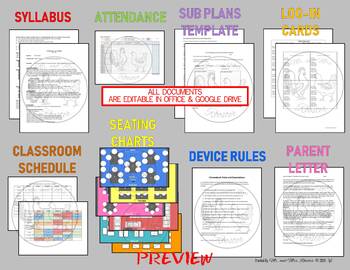
Middle School and High School Technology Beginning of the Year Bundle will start your year off right! We include all the life-saving essentials for any Technology/Computer teacher especially if it is your first year as a technology teacher. While these lessons are created for middle school students, we have used and heard that these will work great for 5th grade and all the way through high school! As a technology teacher working for 3 different schools, I know how difficult it can be to keep track of all the materials needed for each school. We have compiled all our life-saving tools, files, logs, and custom assignments to help you in teaching computers/technology to middle schoolers.
If you are teaching grades 5-9, this beginning of the year for Tech Teachers will work perfectly for your needs to start off the year and keep a strong pace as you get familiar with your routine. We provide 9 Lessons to start you off in the right direction. We have a FULL 3-YEAR Technology Curriculum in development. This beginning Unit is something that can be used for all grade levels. As you progress, we will be release future lesson plans for both 6th, 7th, and 8th grades.
Each of these Digital Breakouts have 20 teacher pages each with an interactive and custom website to use! Your students will learn within each breakout something new, not just solve riddles and puzzles, but they will actually LEARN about the Holiday, event, or activity!
We provide high quality websites, resources, directions, and outlines for each and every breakout! If you are new to Breakouts, we have EVERYTHING you need! If you’re a veteran, you will be very pleased with the quality and authenticity of our Breakout Activities. We give you the BEST Breakouts for the BEST experience!
Students dive into these and work together in teams in ways that teachers have described as:
“My 4th graders LOVED this activity!! Really great for team building!!”
“My 8th graders loved this activity! I had students who never participate in class working on this. They loved how hard it was for them since they had never done any sort of escape or breakout project before.”
Our breakouts are crafted for 4th-8th Grade, but we have been told of third graders and high schoolers enjoying these activities as well! This END OF YEAR BREAKOUT BUNDLE is sure to be a hit with your students and they will often be asking, “When will we do another breakout?” We want to give you an opportunity for all your students to work together and contribute in these amazing team-building activities!
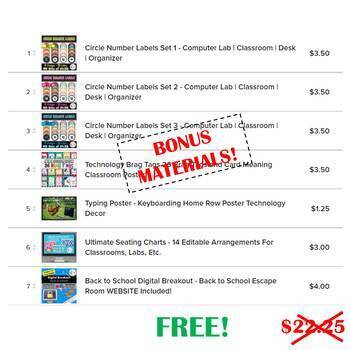
THIS BEGINNING OF THE YEAR TECH BUNDLE INCLUDES SO MUCH MORE!
Please view our preview to see which breakouts are included. The preview contains links to all of the individual breakout products and shows you all of the included documents.
We included all necessary details about this product in both the preview and in the product description below. Please be sure to read both before purchasing. We provide valuable information including what is included in this product as well as what technology is required. After viewing the preview, if you have any further questions about this product, please email us at mrandmrsroosterTpT@gmail.com before purchasing.
THANK YOU!
Thank you for your interest in our product! If you have any questions or comments, please email us at mrandmrsroosterTpT@gmail.com.
As always, we love to hear how our lessons went in your classroom. We appreciate your feedback and love hearing from you. Your feedback helps us provide high quality lessons that teachers and students enjoy, and they guide us to which kind of lessons you would like to see in the future. Please take an opportunity to let us know what you think below. Thank you!
We wish you a break from the busy teaching schedule with a ‘breakout’ this year!
In these Digital Breakouts, students work in teams to find clues in our custom breakout websites!
These breakouts can be used as a team-building activities, holiday activities, library centers, close-reading activities, and much more! The set-up has already been done for you! Students will work together using problem solving, critical thinking, and communication. Classroom team building will be key for each group’s success.
What Makes These Digital Breakouts different from other breakouts?
Our digital breakouts are NOT just a link to a website!
These Digital Breakouts Include (For EACH Holiday):
BOOKMARKS MAKE PERFECT PRIZES FOR COMPLETING THESE BREAKOUTS!
We suggest using these Emoji Bookmarks as prizes when students successfully complete the breakout! These Emoji Bookmarks are sure to put a smile on the faces of your students! 🙂
I’ve never done a breakout before, is this still for me?
Yes! We have included a seven-page breakdown of what makes a breakout and how to run it smoothly in your classroom especially for students who have never used them before. Once familiar, you will be able to just post the website and let them work!
What is a Breakout?
A breakout is an activity where participants work in teams to search for clues to solve puzzles and try to “breakout” of a room or break into” a room or locked container within a specific time frame.
What is a Digital Breakout?
A digital breakout has its origins from both the popular escape rooms and the hunt-and-find games. However, instead of physically unlocking a box or door, participants will enter codes varying in letters and numbers into a lock (a.k.a. Google Form) which will then only unlock when all correct codes are entered into it.
Customer feedback also mentioned the benefit of using a Digital Breakout: “I had gotten some paper escape rooms before and while my kids loved them it was a lot of prep. I loved how easy this was! My kids also loved it and got so excited each time they got one correct. Looking forward to purchasing more of these!”
What are the Benefits to Doing a Breakout in My Classroom?
TO HELP YOUR CLASS DEVELOP:
• Teamwork and Collaboration
• Communication
• Resourcefulness
• Critical Thinking Skills
• Motivation and Engagement
THEY HAVE MANY USES, SUCH AS:
• Extending a lesson or concept
• Reviewing for a test
• Search and research practice
• Reinforcing concepts
• Building critical thinking skills
• A class game or activity
• Reinforcing teamwork and communication skills
What grade levels are Mr and Mrs Rooster’s breakouts designed for?
Our breakouts are crafted for 4th-8th Grade, but we have been told of third graders, honors students, and high schoolers enjoying these activities as well! We include several resources in our breakouts to meet the needs of all teachers and students, such as clue cards and recording sheets. We want to give you an opportunity for all your students to work together and contribute in these amazing team-building activities!
How long should it take students to break out?
It really depends on the grade level and their experience with the Breakout concept. The younger they are, the longer it may take, while the older they are, it should go faster, but if they have no experience with breakouts, it will most likely take any group longer the first few runs. Once students are familiar with it, they will have an idea of what to look for; it is the developing of that mindset. Our Breakouts are planned to have a maximum of 40 minutes each session with a teacher flexibility allowing all students to enjoy with clue cards, no clue cards, or however you prefer!
What technology is required?
Since it is a DIGITAL breakout, you will need to have access to electronic devices such as PCs, Macs, Chromebooks, iPads, tablets, or phones and all devices will need to have access the internet. In addition, our custom made websites are Google Sites, so you must have access to Google Sites Public. Oftentimes, teachers can work around this by using the site with the students not logged into their accounts. Check with your tech support before purchasing if you are unsure if your students will have access to Google Sites Public. Google accounts or Google Classroom are NOT required, although our breakouts can easily be used through Google Classroom, if available.
I am having trouble opening files. What should I do?
Sometimes, the TpT website glitches and has trouble downloading files. If this happens, we recommend dragging the file to the desktop and extracting the file there. If this still does not work, please e-mail us at mrandmrsroostertpt@gmail.com with the name of the product, purchaser, and the date of purchase so we can help you specifically. Thank you.
Are these activities 100% digital or would printing be required for each breakout?
You have multiple options to choose from, one of which is 100% digital. There is a helpful Understanding the Locks page which can be posted as an attachment or printed off to help students. The Clue Cards could also be read to the student groups by the teacher or they could be printed off and handed to the students. Printing is completely optional. All of these breakouts are on our custom websites and DO NOT require any printing or setting up stations, cutting, packaging, etc. These are truly a ready-to-go activity! Other options do include printing. For example, if you would like to print off the Understanding the Locks page or the Clue Cards, that is completely your choice. Do what works best for you and your students!
What people are saying about our Digital Breakouts:
“Easy to use. Kept kids engaged. We love Mr and Mrs Rooster’s digital breakouts!”
“I loved how thorough the directions and explanations were for using this. No questions after I read through it. The hint cards and recording sheets are a great addition to this breakout idea. Thanks!”
“This was my first time trying a digital breakout with my 5th grade library classes. They loved it, and caught on quickly! Thank you! “
“My students had an absolute blast doing this digital breakout. Instructions for both teachers and students were straightforward, well-organized, and clear. Hint cards were a great added touched and offered just enough to help get students to think towards the solution. Such a great product!”
“Wow! Your directions were very clear and spot on! The students were engaged the entire time and really enjoyed participating in the breakout. I will definitely be purchasing more. Thank you!”
“My 4th graders LOVED this activity!! Really great for team building!!”
“My 8th graders loved this activity! I had students who never participate in class working on this. They loved how hard it was for them since they had never done any sort of escape or breakout project before.”
“This resource is so much fun. It is detailed and thorough, and I think that the kids will really enjoy using it. It is definitely going to require some critical thinking!”
“This is my second breakout I have used and I LOVE them! The kids had so much fun. They are challenging (for fourth graders), but awesome. I love how it isn’t “easy” and they have to think out of the box. Best part–all I had to do was print and go. LOVE LOVE these breakouts. So easy and ZERO prep on my part! Thanks!”
“As always, a great product. Thanks!! I will continue using your products!”
All content, designs, and images are copyrighted property of Mr and Mrs Rooster and may not be redistributed.
Content can be downloaded and printed for your own personal use.
Purchasing this product gives you permission to use this product in one classroom only. You will need to purchase additional licenses to use in additional classrooms.
You may not post this resource on websites or in the public domain.
Content and graphics may not be resold or shared as is.
Graphics and content may not be altered and repackaged as new products.
All images are from public domain or created directly by Mr and Mrs Rooster. Public domain images include images taken by employees of various US Government agencies which require no attribution; images published prior to 1923; or images that have otherwise been released to public domain.
Did you know that when you leave feedback for a paid product, you receive credit toward your TpT account? Want to rack up some free credits? Go to your “My Purchases” page (logged in) and you will see a “Provide Feedback” button. Rate your paid products and get your money back for your money spent! We thoroughly enjoy and appreciate receiving your feedback and you receive credit! It’s win-win!
Please see the “TpT Credits” posting for more details and your current credit balance (logged in).
Our Store: Mr. and Mrs. Rooster – Be the first to know when we upload new products, discounts, and freebies by clicking on the green star next to our store logo to become a follower!





 Loading...
 Reload document
 Open in new tab


Reviews
There are no reviews yet.