Middle school and high school students LOVE these lessons! We developed these lessons for a project-based working environment and works great with any Project Based Learning or STEM goals. We give you the option to have as much or as little instruction time while giving your students the maximum working environment.
Made for use with:
PC
Mac
Chromebook
All resources are organized for assigning through Google Classroom!
Ready-to-post directions make these lessons a BREEZE assigning and preparing. Using Google Classroom, you may never need to PRINT again! If you are limited on technology or lacking a class website, we have provided printable directions so students can follow along as well!
In Set 1, students will use professional websites to create music, logos, floor plans, animation, and will research Snapchat and the latest eco car! These are sure-fire ways to get your students engaged in technology without the hesitation.
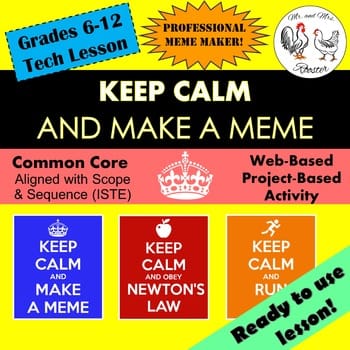
In Set 2, students will design 3D objects, word clouds, create custom memes, link up hypertexts, research Instagram’s privacy policy, and guide their classmates on Google Maps as a personal GPS!
Be sure to check out our PREVIEW to see what to expect in this incredible package! No one has tech lessons like this! We have a passion to make learning fun and engaging no matter the skill level! We even had students using a free-styled version of Photoshop last year! Technology is all around us, sometimes we just need help discovering new ways to use it!
9 Lesson Plans and TONS of resources to get you on the right track! This resource starts the year off strong so you can enjoy your time teaching and making connections with less time testing and planning. This is the kick-starter to our FULL-YEAR Middle School Technology Curriculum! Snag it now at its lowest price!
*Additional student tutorials with screen-shots for easy teaching!
*Printable and up-loadable options to use through Google Classroom!
*Links and Resources on how to set up and get familiar with Google Classroom!
*Copy and Paste Online Directions!
*Extension Activities!
*Worksheets and Answer Keys (When Applicable)
*All necessary JPEGS for student research and inspiration!
*Pre-Made song: “Mr. and Mrs. Rooster – Sample” to use with Make Your Own Music Lesson!
*How to take a screenshot directions!
*Alternate directions for appropriate grade level (When Applicable)
*Background information for teacher use and class support!
*How to right-click directions!
*No Watermarks!
*Find new ways to incorporate educational technology in the classroom!
Happy Teaching!
UPDATES
Instagram Privacy Policy
***UPDATED 10-6-19
-Lesson Plan and commentary
-Privacy Policy Highlights
-Parents’ Guide to Instagram
-Know How to Talk with Your Teen about Instagram
***UPDATED 11-16-19
-Added 3 Student Examples
3D Printing- Block Builder!
***UPDATED 3-5-2023
-Lesson Plan and commentary
-Website and directions
-Student directions
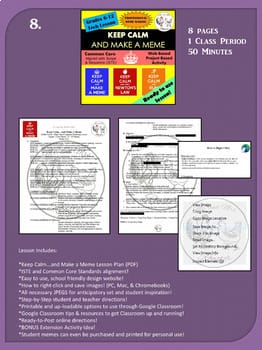
Keep Calm…and Make a Meme!
***UPDATED 1-12-24
-Lesson Plan and commentary
-Website and directions
-Student directions
What people are saying about these lessons:
“My 8th graders absolutely love this project!”
“Great! My classes loved doing this! I teach high school!”
“My 6th grade students really enjoyed this lesson. They were very excited about being able to mix their own music. The instructions were easy to follow and we didn’t run into any difficulties.”
“I was amazed at the creativity and detail level that my students put into this project. The instructions were well written and easy to follow and we discovered an excellent site to add to our reprotoire.”
“Thank you!”
“Makes my life so much easier!”
“Great product and formatting”
“LOVE IT!”
“Very useful in my tech class. Thanks!”
“:)”
“I can’t wait to use these lessons.”
“Thanks!”
“Perfect thank you!”
“This worked well as part of 8th grade stations. Little adaptation was required and students enjoyed working with music.”
“Looking to use to incorporate social studies in my technology courses.”
“Great lesson for fill in lesson when working through applications thank you”
“Students really enjoyed this.”
“Looks fantastic! have yet to use this but have used other from you and kids are always super engaged. Thanks.”
“I am hoping to use this with my 5th graders, I am sure they will love it! Thank you.”
“This adds onto a lesson I already have in concept thanks so much”
“Looking forward to trying this with my 8th graders.”
“Great for a sub activity.”
“Students enjoy this!”
“I have used this in several of my classes! Great info!”
“This is my first time teaching computers in 11 years!! I didn’t know where to start! But your bundle gave me a jump start on how to write the lessons, standards EVERYTHING and the students love the lessons!! I’ll purchase every bundle you produce if it’s like this! THANK YOU SO MUCH!!!”
“This is going to make my life so much easier!”
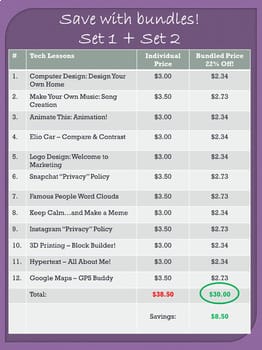
“Definitely recommend you buy both bundles (12 lessons) – excellent and time-saving!”
“This saved me when I taught computers!!”
“Great lessons! Thank you!”
“Thank you! This was really helpful.”
Elementary Specific Tech Lessons!
While these lessons are perfect for Middle school through High school, we have several lessons catered for Elementary such as:
*Click FOLLOW to get notified of our next technology lesson!
**Your feedback helps guide us to which kind of lessons you would like to see in the future. Please take an opportunity to let us know what you think below. Thank you!**
————————————————————————
Buy the individual BUNDLES, lessons or see full descriptions for each lesson HERE!
A snapshot of what people are saying about our Digital Breakouts:
“Easy to use. Kept kids engaged. We love Mr and Mrs Rooster’s digital breakouts!”
“I loved how thorough the directions and explanations were for using this. No questions after I read through it. The hint cards and recording sheets are a great addition to this breakout idea. Thanks!”
“This was my first time trying a digital breakout with my 5th grade library classes. They loved it, and caught on quickly! Thank you! “
“My students had an absolute blast doing this digital breakout. Instructions for both teachers and students were straightforward, well-organized, and clear. Hint cards were a great added touched and offered just enough to help get students to think towards the solution. Such a great product!”
“Wow! Your directions were very clear and spot on! The students were engaged the entire time and really enjoyed participating in the breakout. I will definitely be purchasing more. Thank you!”
“My 4th graders LOVED this activity!! Really great for team building!!”
“My 8th graders loved this activity! I had students who never participate in class working on this. They loved how hard it was for them since they had never done any sort of escape or breakout project before.”
“This resource is so much fun. It is detailed and thorough, and I think that the kids will really enjoy using it. It is definitely going to require some critical thinking!”
“This is my second breakout I have used and I LOVE them! The kids had so much fun. They are challenging (for fourth graders), but awesome. I love how it isn’t “easy” and they have to think out of the box. Best part–all I had to do was print and go. LOVE LOVE these breakouts. So easy and ZERO prep on my part! Thanks!”
“As always, a great product. Thanks!! I will continue using your products!”
| middle school technology bundle year long | middle school technology year long bundle | middle school technology curriculum | middle school computer lessons bundle | middle school computer curriculum |
All content, designs, and images are copyrighted property of Mr and Mrs Rooster and may not be redistributed.
Content can be downloaded and printed for your own personal use.
Purchasing this product gives you permission to use this product in one classroom only. You will need to purchase additional licenses to use in additional classrooms.
You may not post this resource on websites or in the public domain.
Content and graphics may not be resold or shared as is.
Contents and designs may not be altered and repackaged as new products.
All images are from public domain or created directly by Mr and Mrs Rooster. Public domain images include images taken by employees of various US Government agencies which require no attribution; images published prior to 1923; or images that have otherwise been released to public domain.
Did you know that when you leave feedback for a paid product, you receive credit toward your TpT account? Want to rack up some free credits? Go to your “My Purchases” page (logged in) and you will see a “Provide Feedback” button. Rate your paid products and get your money back for your money spent! We thoroughly enjoy and appreciate receiving your feedback and you receive credit! It’s win-win!
Please see the “TpT Credits” posting for more details and your current credit balance (logged in).
Our Store: Mr. and Mrs. Rooster – Be the first to know when we upload new products, discounts, and freebies by clicking on the green star next to our store logo to become a follower!



 Loading...
 Reload document
 Open in new tab


Reviews
There are no reviews yet.