Keyboarding: Independent writing activity for students on a recurring basis!
Made for use with:
PC
Mac
Chromebook
All resources are organized for assigning through Google Classroom!
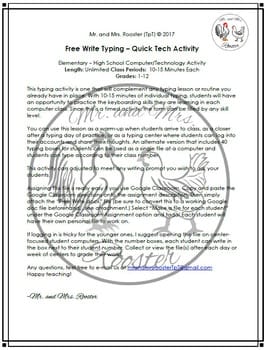
This typing activity is one that will complement any typing lesson or routine you already have in place. With 10-15 minutes of individual typing, students will have an opportunity to practice the keyboarding skills they are learning in each computer class. Since this is a timed activity, the form can be filled by any skill level.
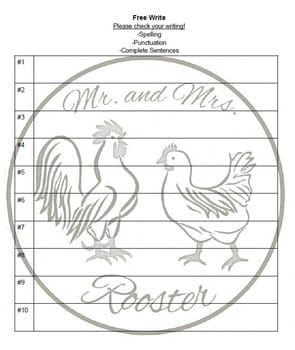
You can use this lesson as a warm-up when students arrive to class, as a closer after a typing day of practice, or as a typing center where students can log into their accounts and share their thoughts. An alternate version that includes 40 typing boxes for students can be used as a single file at a computer and students can type according to their class number.
This activity can be adjusted to use with any of your favorite writing prompts!
*Copy and Paste Google Classroom Directions for Activity (Editable)
*How to convert a Microsoft Word file to an editable Google Doc file (PDF)
*Teacher Notes on how to use the activity (PDF)
If you want technology lessons, projects, and student tutorials all designed for use with Google Classroom, please check out our technology lessons below!
*Click FOLLOW to get notified of our next technology lesson or activity!
**Your feedback helps guide us to which kind of lessons you would like to see in the future. Please take an opportunity to let us know what you think below. Thank you!**
————————————————————————
COME AND VISIT OUR STORE!
If you enjoyed this product, please visit our store to see our other products! We have a wide range of resources including Technology Lessons, Science Resources, A Free Study Hall Bundle, and other creations to spice up your classroom and TpT resources!
We SPECIALIZE in Technology Lessons and Activities!
Below are our Technology lessons available individually or the bundle of your choice! (21%-23% OFF with BUNDLES!)
Did you know that when you leave feedback for a paid product, you receive credit toward your TpT account? Want to rack up some free credits? Go to your “My Purchases” page (logged in) and you will see a “Provide Feedback” button. Rate your paid products and get your money back for your money spent! We thoroughly enjoy and appreciate receiving your feedback and you receive credit! It’s win-win!
Please see the “TpT Credits” posting for more details and your current credit balance (logged in).
Our Store: Mr. and Mrs. Rooster
Be the first to know when we upload new products, discounts, and freebies by clicking on the green star next to our store logo to become a follower!


 Loading...
 Reload document
 Open in new tab


Reviews
There are no reviews yet.